Not One Size Fits All – Easyrigs and You

I’ll never claim to know it all. I’m a camera operator and there’s always going to be gaps in knowledge, new technology to learn, or new techniques to master. And you too should never stop learning.

So when I entered season 3 of a reality show, I was definitely surprised when the Easyrig production provided for me just didn’t feel right.

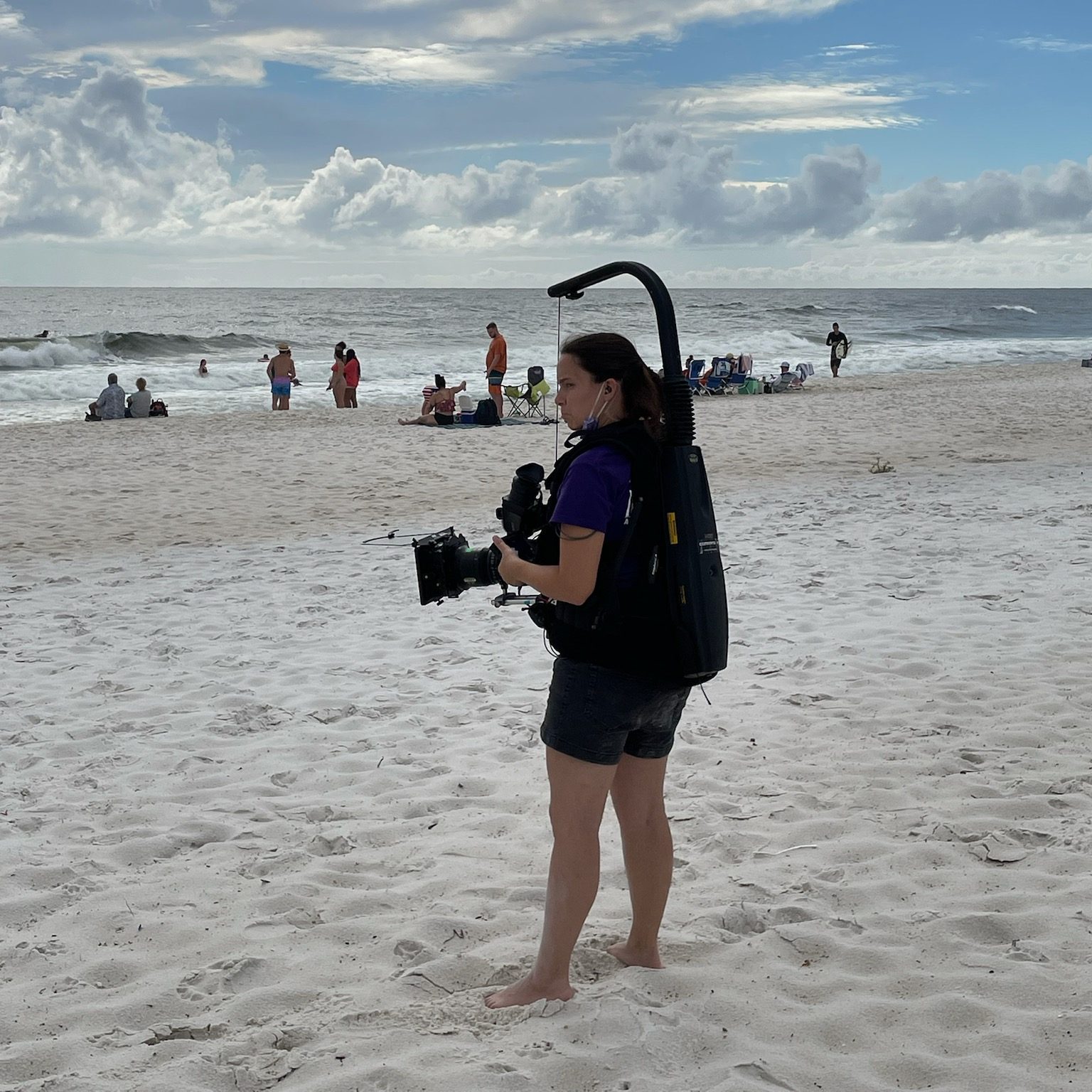
For those not in the know yet (and that’s okay, remember what I said about learning?) – An Easyrig is a camera support system that helps reduce back strain especially when doing handheld with heavier cameras. You probably wouldn’t use one with a smaller camera, like a Lumix or A7s, but for your bigger cameras, it helps a lot to distribute the weight.

It’s sort of a vest thing – different from the Steadicam because it’s a lot softer material in the front – and it has an arm over top that carries the camera via a clip and string. Everything’s attached to a pulley system inside the hardshell on the back.

There’s straps and things to help you adjust it to your body but what I didn’t know… was that the Easyrig wasn’t one size fits all.

We started a scene in an office where a bunch of cast members were doing a meeting. It was going to be a long scene, we knew that. It would be difficult to stop and start again, so we prepared for the long haul.

But as I was operating, I felt the vest slipping lower and lower. I tightened it to the point where it was nearly suffocating, and it was still slipping. The lower portion of the vest where there was a hard point eventually rested on the top of my thigh, and I tried to push through the discomfort.

Of course, that’s when my leg began to go numb.

I kept trying to readjust my body and how I was holding the camera in order to find some relief and power through the rest of the scene. But it wasn’t working. My leg was tingling and going numb and I knew there was a problem.

I finally got on the walkie – something I try not to do during a scene unless it’s absolutely necessary – and called out to production that something was wrong and I needed to set down my cmaera.

Crickets.

Unfortunately for me, they either didn’t hear me or nobody knew who should answer. That’s a problem.

My leg was getting worse. I was probably just going to cave and set the camera down mid-scene, which was something I was loathe to do. I called over walkie again. No response. But then my DP came in and said “Hey, my B cam needs a break. We’ve got to stop now.”

And we did. I took everything off, re adjusted again, took a mini-breka, and went back into it. The rig was slightly better after the break but… it was still starting to cut into my thigh. I found myself hiking up the bottom of it just to keep going with the scene. It was rough. I knew something was wrong.

I ended up calling 16×9 Inc for help. 16×9 Inc is an authorized Easyrig dealer, and the guy on the phone (I’m so sorry I don’t remember your name) walked me through what I needed to know about Easyrig fits. We decided that the right size for me would be a different model, the Easyrig Gimbal Flexvest.

When I got the new Easyrig it was like the clouds finally parted and I could see the sun.

So now I’m the first person who will tell female and smaller-framed operators “Make sure you get the right fit. Easyrigs are not all created equally. They are not one-size-fits-all.”

Putting the Easyrig on

The Easyrig slides on sort of like an awkward, top-heavy backpack. Whenever putting on or using the Easyrig, you need to be aware of your surroundings and of the people around you. You are now taller and bulkier, plus you have a camera that could swing free and hit someone if you’re not actively controlling it.

I usually adjust the waist straps first to get the rig situated properly on my hips, then clip on the chest harness part. Tighten straps for the chest harness so it’s snug, and do the same for straps that are connecting the top to the bottom.

Test the fit by grabbing the vest and seeing if it moves. If it does, you’re not tight enough. Then also test the length of the vest by seeing if your legs can move freely up and down without hitting the bottom of the vest. If anything moves, tighten stuff up. If’s its all the way tight and things still move (especially when you put weight on it) it’s time to consider a different rig or a different method to operate the camera.

It it absolutely not worth hurting yourself to accomplish any shot.

Instructional Video

Dom from LensProToGo goes over how to fit the Easyrig on your body in this video:

Be safe while operating, friends!

Podcast update

We’ve been hard at work bringing Lights, Camera, Remake to life. We are currently up to 11 episodes on Spotify and I’m slowly uploading the episodes to Youtube as well.

We will be looking for sponsors as we grow.

In the meantime you can support us by following on your podcast streaming platform of choice and sharing the episodes or reels we put out. This is a labor of love and we enjoy sharing it with everyone. The response has been wonderful so far.

Instagram: https://www.instagram.com/lightscameraremakepodcast/

Youtube: https://www.youtube.com/@LightsCameraRemakePodcast

Lights, Camera Remake! A Podcast about Hollywood Unoriginality

Yet another person with a podcast. Oh my goodness. But let me explain.

One of the age-old complaints about movies and Hollywood in general is that there’s no originality left. We see endless remakes, reboots (slightly different), sequels, spinoffs and adaptations. Can’t they come up with anything new?

As I began to dig into this idea, I found some surprising things. Like the fact that Little Shop of Horrors -the musical comedy horror starring Rick Moranis and Ellen Greene? – was actually a remake of a low budget movie from 1960. Did you know that Martin Scorsese’s The Departed is based on a 2002 Hong Kong film Internal Affairs? 1998’s You’ve Got Mail is a remake of The Shop Around the Corner (1940). Ocean’s Eleven (2001) is a remake of Ocean’s Eleven (1960).
A remake of an old movie can bring a classic story to a new audience… and also sometimes make audiences really angry.

That passionate knee-jerk reaction is worth discussing.

I’d love to see more originality in the movie theater. The problem is — those movies have a harder time finding an audience.

Hollywood studios and executives are running a business, and they want to make money. And working with something that has established IP (like a Marvel movie, or a book adaptation, a remake) somewhat guarantees an audience will attend. At the end of the day, they just want to make money and make their shareholders happy. And they want to keep their jobs.

Anyway, my friend Erica Strout and I got talking, usually at work in between setups or at lunch. We met on a reality show TV show with myself working as the camera operator and Erica as my camera assistant. We became fast friends. And then we watched movies together. And had a lot of discussions about film in general.

Now we’re doing the Lights, Camera, Remake! Podcast.

This amazing artwork created by Taylor Rebyanski!

Is it always a bad thing to see a remake of a classic (or possibly unknown) movie? Our podcast looks to break it down and see if there’s merit to Hollywood shirking an original idea for a retelling.

On each episode we’ll look at a movie and its remake, or sometimes a movie and its sequel, to determine if Hollywood rehashed it for a reason or for a cash grab.

Episode 1 is about Solaris (1972) and Solaris (2002).

Solaris is an atmospheric Russian science fiction film based on a book. It was later remade in 2002 starring George Clooney.

You can listen to the episode on Spotify or right here:

Episode 2 is Little Shop of Horrors (1960) and (1986).

Next up this week is Weekend at Bernie’s! The episode will be uploaded on Wednesday, Jan 22.

Follow us on Spotify, Instagram and Facebook!

https://www.instagram.com/lightscameraremakepodcast/

https://www.facebook.com/profile.php?id=61560111332548

We’ve also got an email you can submit ideas, comments or random concerns too. We understand you have those.

LightsCameraRemakePodcast@gmail.com

http://www.screenrant.com/movies-secretly-remakes-surprising/

theenemyofaverage.com/movies-that-are-remakes/

How to Avoid Film Job Scams – Take Nine

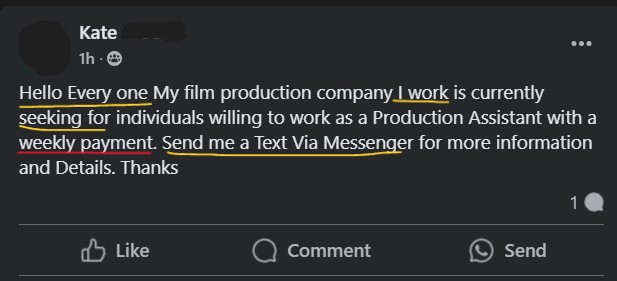
On the Facebook film page I help manage, we’ve been getting flooded with scam posts again. They sneak into the group answering the group rules and questions, pretending to be real people, and then they post something like this garbage:

In my annotations, I marked in yellow the bad English grammar usage. In Red we see where it is obviously a scam.

For some reason, the scammers love to advertise a weekly payment.

As I see them, or as they are reported by community members, these scammer posts are deleted and the user is banned. Sometimes I’ll post about it on the page immediately after and hopefully catch whoever might have already emailed the scammer. But since it is nearly impossible to keep up with scam posts (I just can’t be on the page 24/7 people. I know.) my main goal is to educate our populace so that we all know what signs to look for.

Check out this similar scam job posted on a Florida film group:

I’ve redacted some identifying info like the full email and the name of the poster for two reasons. 1: the name might belong to a real person who was hacked or is being impersonated. 2. I don’t want someone mistakenly reaching out to this person.

To be fair, there’s not a lot in this particular scam job post to clue you in, but we will note a few things here before we dig deeper:

In Yellow: Things that are suspicious. One, “we are seeking” has been in a lot of scam job posts, but it is not necessarily only used by scammers. Two, the weird email they are using. Doesn’t look professional at all. But a scammer might use gmail or something that looks like a company email and a real person may be using a weird email. So it’s not a huge red flag.

In Blue: Some misunderstanding of how professional film people work. We see them stating their budget – not necessary for a PA or a Set Medic to know. But some folks might post this (see how this gets difficult to tell a scam job post?). We also have them clarifying that Production Assistants are also “PAs.” It’s nitpicky but you shouldn’t see that kind of explanation of film terms in a job post.

In Purple: I redacted part of the name but I’ll tell you that a lot of these scammers have been using weird, backwards names. Like Smith John instead of John Smith. I think it’s because they’re stealing the real John Smith’s info but reversing the name. I’ve seen this before with Jeffery Cooper/Cooper Jeffery, though the jury is still out if there was a real guy being personified or if this was just a fella using every random name he could think of.

Luckily, we can see what happens after you contact this potential job. I’m redacting their info as well, but we will call them Lily.

Lily applied to the job after seeing it on the Florida film group. Lily then received texts very soon after applying:

In Yellow: Bad grammar.

In Blue: This scammer clearly posted this scam elsewhere, because they mistook Lily as being in Pennsylvania, instead of Georgia or Florida (the group where it was posted). The scammer then immediately disregards Lily asking if the production is in Pennsylvania because they are just responding with a copy/pasted response.

In Red: Here’s the hallmarks of the scam. They try to lure you in with a flexible working situation that “won’t interfere with your current job.” That’s not how productions work! At all! They also talk about the weekly rate here, which I’ve pointed out countless times is a scammer tactic.

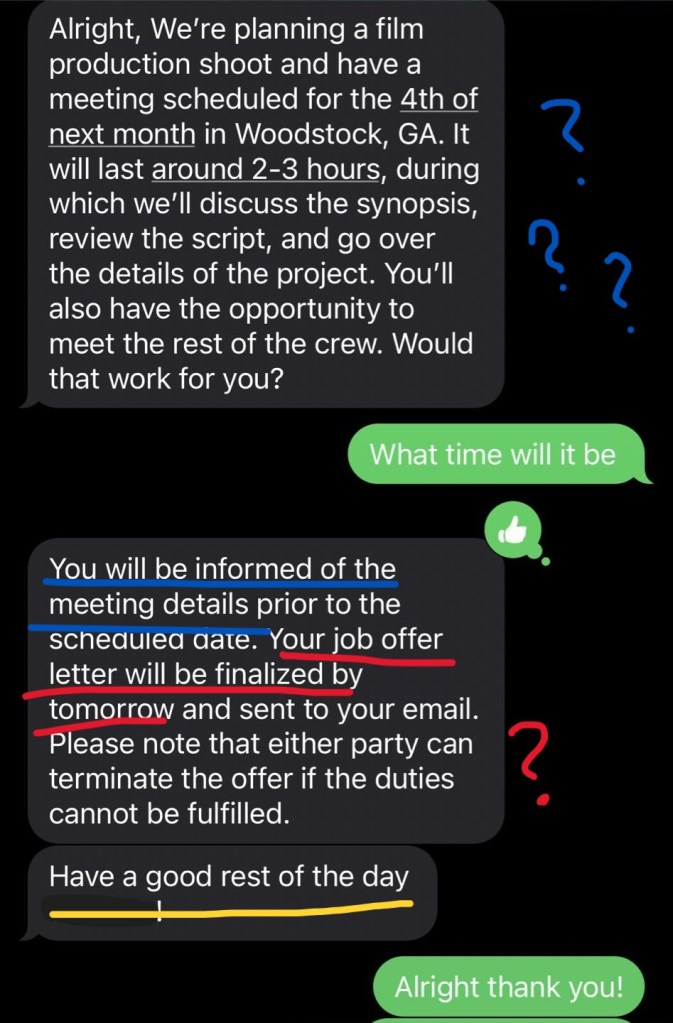
In Blue: Here we have a weird misunderstanding about how production works. This is continued in the next screenshot below. This person is telling a PA about a meeting and discussing the synopsis of the movie and all that. A PA would not need to be at that meeting or need that information. I don’t know why they think including this makes it seem more legit. It just makes it clear they don’t understand the film industry.

In Blue: Continuation of the weird meeting mumbo jumbo. “You’ll also have the opportunity to meet the crew!” Oh how cute. Typically that’s done on … day one of the production. Like everywhere else.

In Red: More scam red flags. A job offer letter is something a traditional job may give you, but productions are short term. If anything, you should be receiving a deal memo.

If you see a suspicious job post in a Facebook group, make sure you report it to the group admins. And if you start getting suspicious texts like these, check it against the red flags we’ve gone over here and in other installments of “How to Avoid Film Job Scams” in order to best arm yourself against a scam.

Sources:

Federal Trade Commission – Consumer Advice: How To Spot, Avoid, and Report Fake Check Scams

How to Avoid Film Job Scams – Take Eight

Since I began this blog series on scams in the film industry, I started a folder on my desktop whenever I found a questionable job so I could put it in the next entry on the topic.

But… I couldn’t keep up. There’s too many. And the same names will pop up again and again, but new ones do too. There’s no way to truly catalogue them, so the best I can do is show you some examples from time to time, list the red flags, and hope to keep you from being taken advantage of in the future.

Google the E-mail

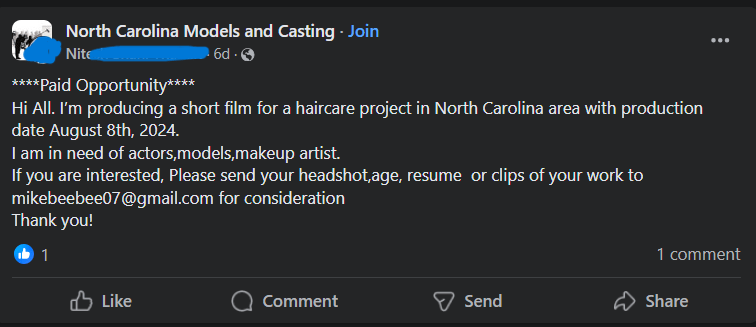
Scammers are a bit lazy too sometimes. You’ll see the same e-mail used by many different screennames. I’ve been chasing this mikebeebee email since at least July this year, having saved examples of this scam from different Facebook groups. I’m mentioning it now because it’s one of the recent ones to plague a group I manage.

This scam email was also used in July, when I saved these screenshots:

As you can see, it’s multiple names and “jobs” but the same scam email. I did blank out most of the names that posted because it’s likely they are hacked accounts and innocent of this posting. Or they could be completely fake profiles. Either way the most important thing is understanding the details of the scam.

Most recently, this one was posted:

Now, what happens if you apply to the fake job? You’ll likely get this email, with the name changed depending on the fake person you’re communicating with. Email screenshot attached with annotations explained below:

In Yellow: Generally bad grammar and grasp of the English language, so it’s likely an overseas scammer.

In Blue: If you are a professional, you do not need an explanation of how to do your job. This is a complete misunderstanding of how professionals are hired for a film set.

In Green: They use “kindly” which a lot of scammers use for some reason, and they’re also asking for all this identifying information. Probably for identity theft or to further sell your information to future scammers.

In Red: This part is where you know it’s a scam. The guy claims he will pay you $2000 before the job. Never, ever accept payment before a job is done. This is a check phishing scam. They are just trying to steal Your money, which they will do once you see the second part of the red section: “This covers your $1500 upfront payment and the talents'(sic) fee ($4,000) payable to their manager.

This is how the check phishing scam works. They issue you a fake check, and before your bank notices the check is fraudulent, you’ll be issuing a check from your own balance to pay the “talent” who is actually the scammer. You are out at least $4,000 at the end of this scam.

According to the FTC, “Fake checks can take weeks to be discovered and untangled. By that time, the scammer has any money you sent, and you’re stuck paying the money back to the bank.”

Production Assistant Scams

This latest one was brought to my attention by a community member on a page I moderate. I’d had my suspicions about the job when it was posted, but I didn’t have enough info to delete and ban the poster until I received further info.

Here’s why this job looks suspicious at first glance and why I didn’t delete it immediately.

  • Casting call – for a production assistant? You only do casting calls for actors. Crew calls for film crew. I chalked this up to someone green in the industry.
  • Grammar “Seeking for.”
  • 3 days, 4 hours of work for a lump sum payment of $700. Again, I thought this was an inexperienced person who doesn’t know how day rates work. But 4 hours a day is suspicious even for a short film.
  • The poster turned off comments. Scammers do this because they know people will start calling them out in the comments. But insecure people also do this.

I couldn’t annotate this one because as soon as I started, I realized I was underlining the entire thing in red. Let’s look at those emails!

Red Flags:

  • Giant block of text. Most gigs will email at best like two sentences to see if you’re available.
  • Atrocious grammar and spelling. They don’t even spell their email correctly.
  • Wishing you good health. This is America, we don’t have that.
  • Apologizing. For some reason a lot of scam communications start with apologizing for being so busy. Maybe the intent is to make them look like they are in high demand or something.
  • Audition – for a production assistant? Oh no honey. But this detail confirms my suspicion that this was also a copy & pasted scam for an actor as well. Remember how the job post was a “Casting Call”? I bet this same scam showed up elsewhere targeting actors or models.
  • I laughed at “Camera Man.” The term is camera operator. But they probably meant Director of Photography.

Let’s look at the next email!

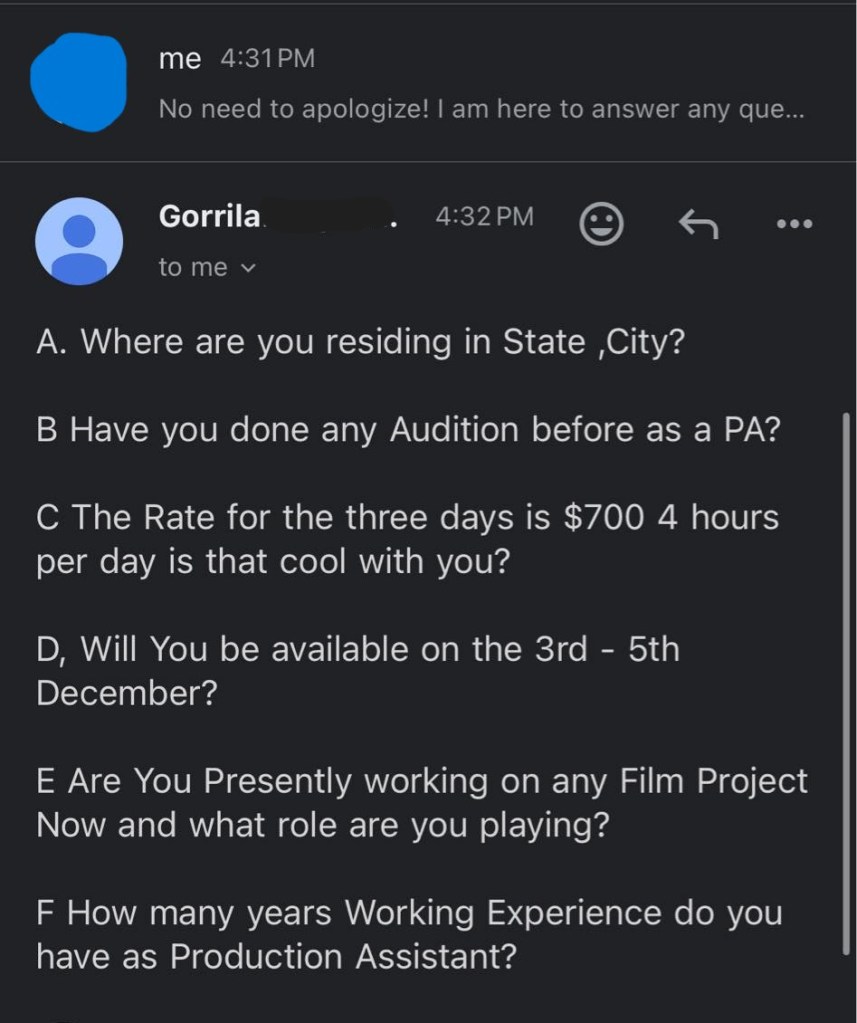
Red flags:

  • Scammer asking where you live (including the state).
  • Audition and PA again.
  • “Is that rate cool with you?” No. Because it’s fake.
  • Are you available the dates we already established?
  • Why are they asking what you’re currently working on? This is none of their business.
  • Asking for years of experience for an entry level position.

And here is the grand finale:

Red flags:

  • Advance payment – It’s a check phishing scam!
  • Also… sponsors? Wth.

Thanks to the community member who sent the screenshots and reached out with questions about identifying scams.

Sources:

Federal Trade Commission – Consumer Advice: How To Spot, Avoid, and Report Fake Check Scams

The Evils of the Rolling Take and Reset

Let’s dig into a pet peeve of many on set: the rolling take.

A rolling take is when you keep shooting and keep repeating the action. Like an actor walking in to a room who flubs a line and goes back to start it over again. That can be a valid reason for a rolling take. No need to re-slate and re-call action. Just try it again.

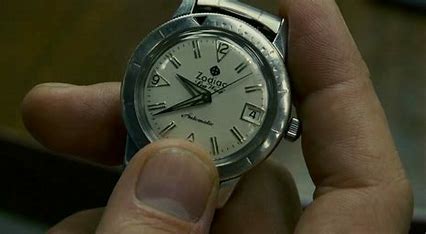
An Insert Shot: A watch being picked up and brought into the frame is a valid reason to do a series of the same action without cutting in between.

A rolling or series take might be done on a particular insert shot to get it right. Let’s say your actor needs to throw a letter to land on a desk just right. The director might ask for a series or rolling take in order to keep attempting that throw to get it the way they want. No fuss, no muss, and no wasting extra setup time to get that insert shot that you’ll see for two seconds on screen.

Directors don’t work the slate but I’ll allow this since it’s clipart.

Imagine this scenario: It’s after lunch. The Assistant Director is informing everyone for the third time that you are now an hour and a half behind on the schedule. You have several more scenes to light and shoot and somehow you have to make up a significant amount of time. Hence the anxiety that leads inexperienced directors to try shortcuts. One of those shortcuts is overusing a rolling take.

After experiencing this on a number of films, I’ve observed that green directors love to overuse the rolling take. They’re feeling the pressure and just trying to get footage in the can. The AD, meanwhile, is just trying to make their day. Now suddenly, you’re filming scene coverage as a rolling take, not cutting when you reach the end of the action, but waiting for the actor to reset and just going with it, maybe for multiple “takes.”

A rolling take going on and on is more trouble than it’s worth.

Time = Money

First, what should be obvious — you’re using up footage. This became less of a crisis when most of us went from actual film stock to digital, which is a much cheaper alternative, but digital does not mean free.

Film costs include the film stock, developing, processing, and digitizing so you can edit on a computer.

But just because you can hit “record” on a camera doesn’t mean that doesn’t cost money. Each card needs to be purchased, and you need to have enough available media to get through the day’s shooting without having to write over those cards with additional footage. Ideally, you want your DIT or media manager making backups throughout the day. That means the production also needs to purchase storage and backup storage for that media.

So let’s say you think you know the costs and you’re still cool with doing 40 minute takes instead of a few 5 minute takes. All that footage needs to be downloaded and viewed, meaning you’re paying for the media manager’s time to download that footage and make copies, as well as the editor down the line. A single 40 minute clip is just going to take longer to download and transfer. And you might be paying overtime to the media manager who is staying late dumping all that footage.

Wear and Tear on Cast/Crew

In the moment, if you abuse the rolling take, you’re quickly using up the energy reserves and physical strength of your cast and crew.

You’re also using up your camera operators and 1st ACs and boom ops and everyone doing something physical for that scene that no longer get that tiny bit of rest to reset themselves.

  • The cast has to stay in-the-moment and may get frustrated, flubbing lines more and more.
  • The boom op has to hold that boom pole and actively follow whoever is talking without getting that small break in between.
  • The camera operators might be doing handheld or Steadicam and are using up their muscles faster.
  • 1st ACs, staring at a screen for minute changes in focus, don’t get to rest their eyes.
  • Script supervisors’ notes get complicated as the same scene plays out multiple times in the same take.

When I’m doing Steadicam or handheld, my least favorite thing is a rolling take, especially if it’s long. I just need time to reset. Sometimes there’s an adjustment needed in a handgrip on a shoulder rig or I need to fix the balance on the Steadicam.

Other concerns? Using up batteries! You might be playing beat the clock with what battery you have left in the camera or on the mic packs.

Closing Thoughts

Using a series or a rolling take can be done with purpose. It’s just another tool in your kit. Abusing it can lead you to creating an uncomfortable work environment for your crew. So before you panic and decide to just “roll on everything” look at it critically and see if a rolling take is necessary or if you need to re-evaluate and be more concise with your time.

Selecting the Best Festival for Your Film

I saw a post online by someone asking about film festivals. They asked if Tribeca, Sundance, and SXSW were the “only” ones. There were a lot of comments at a varying degree of helpfulness.

Let me overwhelm you real quick — There are literally thousands of film festivals. So how do you choose?

What’s your budget?

Not of your film’s production, but to submit to festivals. Submitting to film festivals can cost anywhere from $15-75 or more depending on late fees. Apply early to get the best deal, but that means starting this research early too. Maybe even while you’re in production on the film. Or pre-production.

Submitting to film festivals costs money. You’re going to want to be targeted.

Know your film

Do you have a short or a feature? Was it a student film? What genre is it? All these factors are going to determine what film festivals you should be considering.

Do you have a cyberpunk scifi fantasy? Might not be Tribeca material.

Do you have a sappy romance? Not the right vibe for Sick Chick Flicks.

Research the Festival

Alright, so you’ve made a shortlist of festivals that will accept the length of film and the genre. Now you’ve got to narrow it down more.

First, is the film festival legit? Unfortunately, there’s fests out there that are not honest or forthcoming about what they provide. Some are what’s called “awards mills” that just give an award to anyone who submits. This award, and this festival, is therefore useless in proving your worth.

Other questions are: Do they screen all selected films? Is it screened in a real theater or just some random location? Does the film festival have a proven track record or is it brand new? When in doubt, Google the film festival and see if any complaints come up.

What are the Perks of Submitting to the Festival?

Do they offer great awards like representation, film budget funding, or meetings with high profile producers in the film industry? Are there professional judges? These are certainly bonuses if you submit a film and its received well, because it could possibly lead to more work for you in the future or some good meetings with the right people.

Target the Right Locations

There are film festivals everywhere, but you should have a few nearby that you can actually attend.

Attending film festivals is a form of networking, and it looks better if you’re there in person to meet with people and talk to other filmmakers about their films.

Take Advantage of Panels and Special Attendees

Piggybacking on my last comment, film festival attendance is a great opportunity to network, learn and grow as a filmmaker. Make sure to note whose work you like, who you should reach out to later and talk shop with.

If the film festival has informational panels, even better! Go and learn. When appropriate, talk to panelists and ask smart questions, but don’t take all their time. They’ll appreciate the enthusiasm and the consideration to their time and knowledge.

Closing Thoughts

Getting your film into festivals should not be the final decision you make — it should be a well informed decision you develop over the course of pre- to post-production of your film. Choosing the right ones gets you that much further ahead.

This has been on my mind because I’ve been in talks with someone about creating a local genre-specific film festival in Atlanta, and I want to make sure it’s the best it can be on its first year.

Need more info and tips for submitting to film festivals? Check out the sources below!

Sources:

17 Tips to Find the Right Festival for Your Indie Film

How to Submit to Film Festivals: Tips from an Industry Screener – Adorama

Film Festivals: Where to Submit as a New Filmmaker – Backstage

    Does the Art Directors Guild Suspending their Training Program Signal a Massive Change?

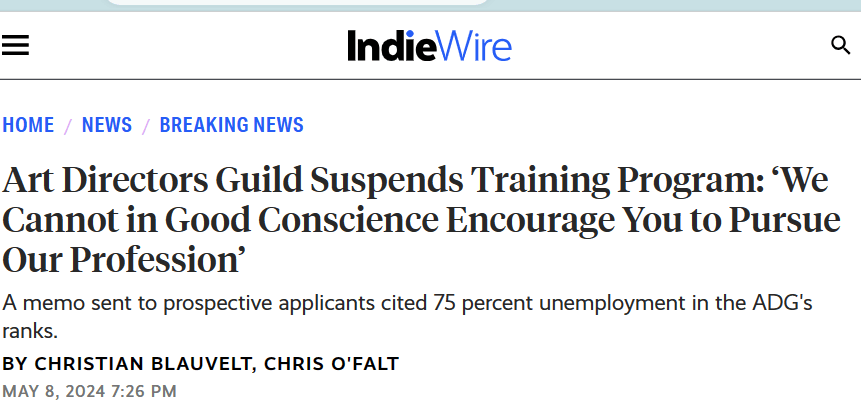
    Recently, this article made the rounds:

    Read more on IndieWire.

    The Art Directors Guild, IATSE 800, is a union representing over 3,000 Art Directors, Illustrators, Scenic Artists, Graphic Artists and Set Designers in the film industry. In the article, we learn that the Art Directors Guild sent an email out announcing they will suspend their training program due to the 75% unemployment rate among its union member’s ranks. This decision is entirely reflective of the ripple effect of the SAG-AFTRA and WGA strikes last year.

    “The industry has not resumed a full, pre-strikes level of productions, and it remains unclear if a return to that status quo is possible in a Hollywood gripped by ever-higher costs, ever-lower revenue, and increased production abroad.”

    -IndieWire

    This also brings to mind how many people I see announcing they are moving to Atlanta and looking for connections in the local film industry. That’s fine but, I hope everyone and anyone who is thinking about going into film for the first time or moving to continue their film career does a bit of research first. We clearly haven’t recovered from the two strikes last year (necessary though they were, they also hurt financially). I also question if we ever fully recovered from 2020, when the pandemic shuttered production across the world.

    But with a pandemic that encouraged people to stay inside, there ended up being a lot of TV being consumed. The streaming companies — Netflix, Hulu, Disney+, Paramount, etc — got excited.

    In 2021, Netflix boosted their budget almost 30%, putting $13.6 billion into content spending. This article from 2021 predicted their budget would balloon to $18 billion by 2025. An sharp upward trend seemed likely.

    In 2023, Netflix content spending was around $17 billion. And before you point out “but 17 is so close to 18!” I need you to realize how vast a number 1 billion represents. If we were to use time as an example: 1 million seconds = 11 days . 1 billion seconds = 31 years.

    Streamers are focusing on more original content in order to keep customers interested. There’s also a noted shift into reality style television, as shows like Netflix’s Nailed It cooking competition series are still popular and much cheaper to produce than narrative content. I’ve also talked before about these companies not greenlighting projects and just outright cancelling them to save a buck.

    The streaming companies blew their budget on a dream, and now the bill has come due. They over estimated their profitability while fighting each other for market dominance. Instead of one triumphing over the others, we have a consumer base watered down and split amongst many services, if they even have streaming at all. Who misses cable now?

    There is also likely a slow up because of this year’s negotiations between the AMPTP and IATSE, Teamsters and Hollywood Basic Crafts. The current 3 year contract expires July 31st. These unions are negotiating for proposals on Pension and & Health Plans, wage increases, residuals and concerns over artificial intelligence.

    A strike doesn’t seem as likely this year. For one, the negotiations appear to be making some headway. Several unions such as Local 892 Costume Designers and Local 728 Lighting technicians have reached tentative deals.

    But, the reality is that most folks can’t afford to have another strike. That’s concerning because of what’s on the docket but also…totally understandable. Those of us in this position are trying to recoup from last year. Some folks haven’t worked at all this year. That’s unheard of in most other professions.

    The fact that the Art Directors Guild suspended their training program is genuinely sad to hear, but it seems to have been done with the very real concern about not putting more pressure on folks who need work right now. As hard as it is to see, not adding trainees in the guild for a time is a kindness. And surely, when things pick up, they can reassess and reopen their ranks to new people.

    Will things ever go back or is this a hint at lasting change? The answer is far more complicated than we can surmise right now.

    Sources:

    Art Directors Guild Suspends Training Program: ‘We Cannot in Good Conscience Encourage You to Pursue Our Profession’

    Netflix’s Amortized Content Spending to Rise 26% to $13.6 Billion in 2021, Analysts Project

    Analysis: Content Spending Will Slow in 2023 as Streamers Pivot to Profitability; Disney, Netflix to Lead Way

    IATSE Lays Out Contract Proposals, Including “Substantial” Health & Pension Plan Increases, As General Negotiations Begin

    Georgia film industry sets another economic impact record

    Steadicam 101: Balancing and Operating

    We’ve learned why we use a Steadicam…

    We’ve covered what pieces make up the Steadicam…

    Now it’s time to balance and actually use the thing!

    Balance

    A Steadicam cannot work properly if the rig is not balanced.

    Again, this is a simplified version of balancing. To really learn, you gotta get your hands on a rig, or at least observe a Steadicam operator as they prep.

    First of all, you need to find the center of gravity, or cg, of the camera. After the camera is built (i.e. it has all the accessories and lens you’re going to use for the shot) you can find the cg by rolling the camera body on a rail. Where the camera is balanced on that rail, mark with a piece of tape or just remember where it is.

    • The camera is placed on the sled via the cheeseplate on top.
    • The post is lengthened to the appropriate length. This is in relation to how much weight is on the camera at the top.
    • On the top stage are the adjustment knobs to move the camera right and left or front and back. This is the fine adjustment.
    • If the rig is perfectly balanced while stationary, you’ve achieved “Static balance.” If there’s time, proceed to:
    • Dynamic Balance.” Spin the post on the balancing peg and see if the camera tilts any direction. You then make corrective adjustments with the fine adjustment knobs, moving the monitor in/out and moving the battery in/out.
    • adjust the tension on the arm so the camera floats where you want it.
    • the vest is adjusted to the operator’s body so it doesn’t slip and pressure is exerted evenly across it.

    Operating

    Actually operating the Steadicam requires a lot of physical and internal adjustments.

    The operator has to have good posture. They walk forward, smoothly, making minor adjustments as needed. They avoid accidentally cross stepping, so they don’t trip.

    While the operator’s feet carry them where they need to go, their hands are busy making sure the camera is where it needs to be pointed. The left hand is on the gimbal, in charge of panning, while the right hand lives on the handle that connects to the arm, moving the rig up and down as needed.

    For more in depth information about Steadicam operating, check out the Steadicam Operator’s Handbook by Jerry Holway and Laurie Hayball.

    Steadicam 101: What Components Make a Steadicam

    When the Steadicam operator walks on set and starts setting up their gear, it can look pretty impressive. Here’s this guy or gal with cases of specialized equipment that looks like it belongs to Robocop.

    Or maybe Alien.

    Contrary to this picture, Steadicams are not all that great at eradicating alien threats.

    So what part is the Steadicam?

    Ah, not an easy answer actually.

    I’ve worked with a number of newer directors, and there’s a bit of a learning curve I often have to help with there. Sometimes I’m asked “So you have a Steadicam? What camera is on there?” And I answer, cautiously, “Whatever camera you want within the weight limit.” But then I figured out…some folks don’t know the camera is actually not part of the Steadicam. The Steadicam is the device that moves the camera around. It’s a dolly if it had feet and shock absorbers instead of wheels and rails. It’s a tripod with an ego. And it’s also not those things.

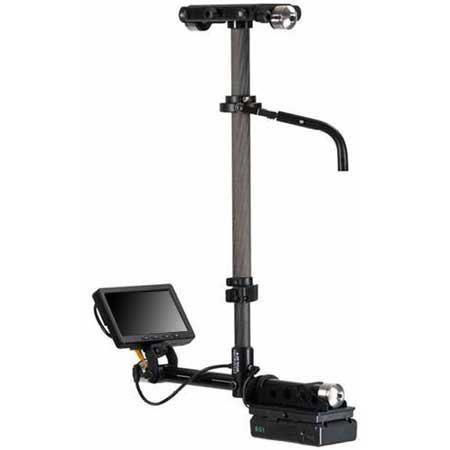
    The Steadicam mainly consists of 3 major components: The Sled, The Vest and the Arm.

    Pictured are parts of the Steadicam M-2.

    Sled

    Pictured is a Steadicam Pilot, a smaller rig for DSLR sized cameras.

    The Sled is the post you see here. The camera is mounted on top, there’s a monitor at the bottom, and batteries power everything from the bottom. This is where the electronics live. There’s wires inside that travel from the top of the top stage to the very bottom where the batteries and monitor reside.

    Arm

    Pictured is a G-70x arm. This arm can handle 13-70lbs of weight.

    The arm is really where a lot of the magic happens. The arm has sections and springs that compress or expand to lift or lower the rig with ease. The arm also isolates movement, taking away the natural bounce of a human’s walk and translating it into smooth moving video.

    Vest

    Two types of vests pictured above: A Fawcett Exovest and a GPI Pro vest. There are several varieties.

    The Vest is where this contraption connects to a human body. The vest takes the weight and distributes it across the body. They are quite adjustable. Only in certain cases will an operator need to get a specific type of vest, due to small size or even just preference.

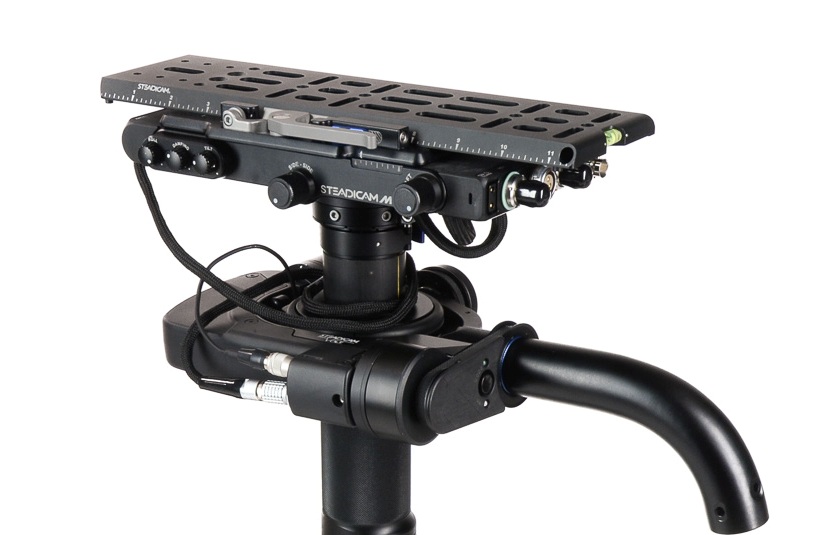
    Let’s take a look at the top of the sled

    Here’s an example of the top stage (top platform where the camera ends up being mounted). There’s a plate that goes on the very top that you screw the camera into. Adjustment knobs on the sides move that plate either left and right or front and back. This will serve in helping balance the camera.

    Also on the top stage are all sorts of places to plug in wires! Several of these inputs are to get power from the battery at the bottom into the camera or to power the accessories. Why not just leave a battery on the camera when you put it up there? Well, you can, but anything you put on the Steadicam will add more weight. Sometimes, you gotta remove as much weight as possible.

    You can also see the SDI inputs (pictured right, at the short end of that top stage). This is how you get the video feed from the camera to the monitor at the bottom of the sled.

    The Gimbal

    This is the handle that sticks out from the sled post and connects to the arm.

    The gimbal is 3-axis, meaning it moves freely in three directions for pans, tilts and roll. The gimbal handle that connects to the arm is where the right hand goes, and the handgrip below on the post itself is where the left hand goes. This can be reversed for left-handed users who operate “goofy footed.”

    Other Accessories

    Plenty of other accessories and mounting devices enable the Steadicam operator to work in different conditions. There are mounts so they can operate from a car, more advanced gimbal technology in the form of the Volt, and things like rickshaws and the Trinity to change the possibilities of what operating can offer.

    But this is an intro series and you’ll have to dig into all that when you decide you want to learn more.

    Part 3: Balancing and Operating, is coming next.

    Steadicam 101: Why Use a Steadicam?

    I had the honor of co-hosting a Steadicam workshop for the Women in Focus Summit alongside fellow operator Kurush Bakhtiari. The event run by Ladibug Studios and ColourCo Rentals had several informational panels on camera, lighting and directing with a focus on getting more women and non-binary folks into production.

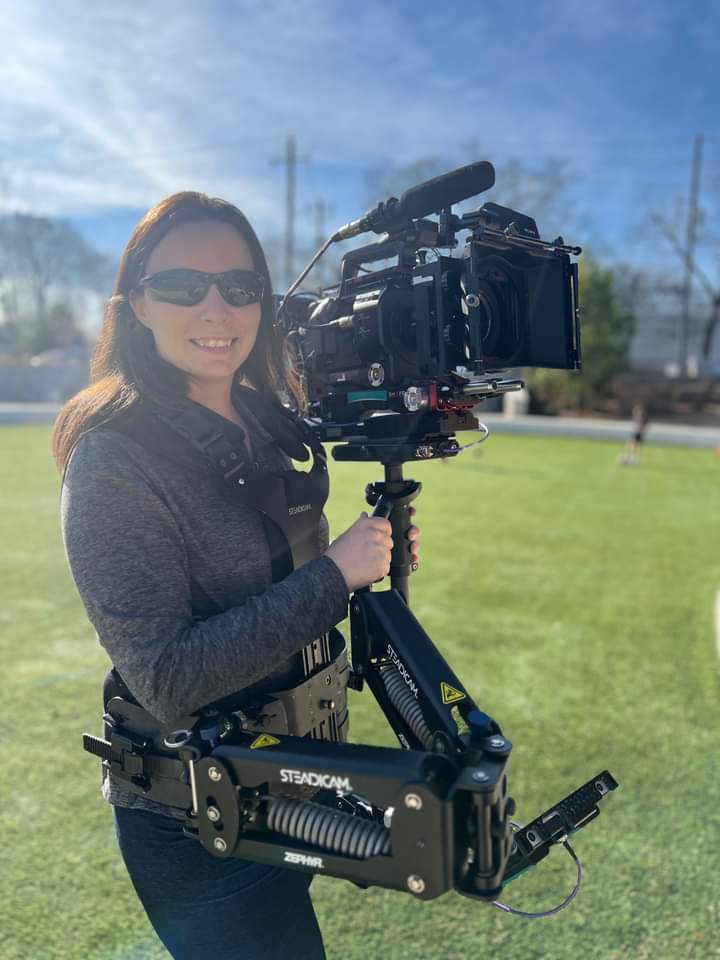
    Kurush with his Archer and Klassen vest, me with a Zephyr kit.

    I didn’t expect all of our attendees to take up the mantle of Steadicam. Sure, maybe we inspired a person or two who was curious or knew nothing about the skill, but learning about Steadicam is not just for the people who will wear the vest.

    Plenty of crew members interact with the Steadicam operator: The AC who builds the camera to go on the rig, the grip who takes the rig off the operator when they need a break, the other grip who acts as a spotter for safety. Widen your parameters also to the 1st AD who is trying to keep a schedule and time transitions between sticks and camera accordingly, and to the director and DP who will be asking the Steadicam operator to bring their vision to life.

    Understanding the roles, responsibilities and limitations of other positions on set just makes you better at your own job.

    This will be a 3 part series to go over the basics.

    What is a Steadicam?

    Pictured: The Arm, Sled, Docking Station and Vest of a M2 model Steadicam.

    A Steadicam is a tool used to create fluid dynamic shots unlike any other camera movement apparatus. It consists of a vest worn by the operator connected to an articulating arm and a post that holds the camera and electronic components. The arm does the job of evening out the natural bounce of a body walking, smoothing out the shot. If you were to attempt the same with handheld, it couldn’t be as smooth. Even if I breathe with a camera on my shoulder, the movement translates to the image.

    Examples

    Popular Steadicam examples include the stairs run from Rocky, the hallway shot in The Shining, and the Copacabana scene in Goodfellas. If you haven’t seen those, by all means click the links and watch the clips. Since those are the most commonly used examples, I wanted to show some fresh ones. Kurush and I put together a video of examples of a handful of other movies that have inspired us.

    What we can learn from these examples:

    Point Break: The camera expertly follows a high energy scene in a police station, whipping between characters and moments to carry the scene forward. This is a more interesting take on the typical police station scene without being static and stoic. This clip gives a real sense of space in the station, from the character’s entrance to how he moves around the bullpen. This shot switches between framing the main two characters from behind, getting a wide shot of the entire place, and returning to frame the main characters from the front. There’s a nice variety of shots without ever needing to break away for coverage.

    Snake Eyes: In this example, we see how perspective changes as the Steadicam moves around the scene. At one point, the Steadicam becomes the point of view for one character, the boxer. When we reveal who it is, the Steadicam backs up to include him physically in the scene.

    Birdman: The movie is depicted as if it is a single camera following characters around for a continuous shot. Since that is the technique, shots are constructed by the camera moving closer or farther away from speaking characters, moving around the stage to reveal things and traveling between locations around the theater by following one character at a time.

    Baby Driver: This is near the beginning of the film, introducing Baby and his connection to music in the film. This is a well choreographed and timed performance between the camera operator and actor. See how things are revealed as Baby walks how each element of the scene adds to the soundtrack (honking cars, a trumpet player on the street, pedestrians). Pay attention to the background on a second watch of the scene.

    Last Night in Soho: In this thriller, Eloise is experiencing flashbacks to the 60s to a vivacious woman named Sandie and a connection to a series of murders. Eloise sees herself in Sandie’s perspective, sometimes in the mirror, and sometimes replacing her in the scene. This is another well choreographed number. In the video I included the behind the scenes clip showing the Steadicam operator. Note how Eloise waits for her turn to cut in to the dance, and how moments are revealed as the Steadicam travels around the main characters. You can also see a spotter helping the Steadicam out. There’s a lot of moving parts and nobody wants to have a camera run into them!

    In Part 2, we’ll talk about the components of the Steadicam and why balance is so important.