Not One Size Fits All – Easyrigs and You

I’ll never claim to know it all. I’m a camera operator and there’s always going to be gaps in knowledge, new technology to learn, or new techniques to master. And you too should never stop learning.

So when I entered season 3 of a reality show, I was definitely surprised when the Easyrig production provided for me just didn’t feel right.

For those not in the know yet (and that’s okay, remember what I said about learning?) – An Easyrig is a camera support system that helps reduce back strain especially when doing handheld with heavier cameras. You probably wouldn’t use one with a smaller camera, like a Lumix or A7s, but for your bigger cameras, it helps a lot to distribute the weight.

It’s sort of a vest thing – different from the Steadicam because it’s a lot softer material in the front – and it has an arm over top that carries the camera via a clip and string. Everything’s attached to a pulley system inside the hardshell on the back.
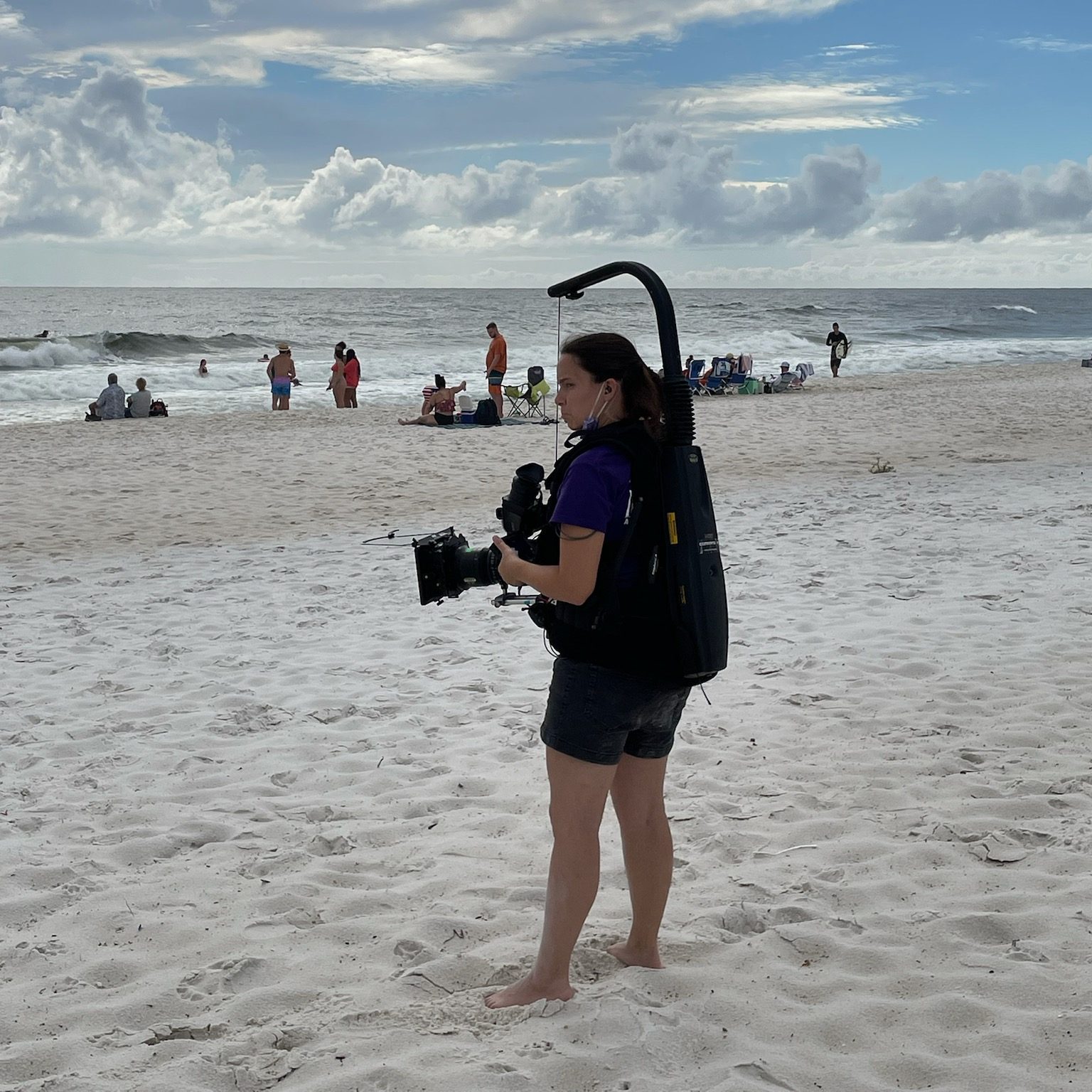
There’s straps and things to help you adjust it to your body but what I didn’t know… was that the Easyrig wasn’t one size fits all.

We started a scene in an office where a bunch of cast members were doing a meeting. It was going to be a long scene, we knew that. It would be difficult to stop and start again, so we prepared for the long haul.

But as I was operating, I felt the vest slipping lower and lower. I tightened it to the point where it was nearly suffocating, and it was still slipping. The lower portion of the vest where there was a hard point eventually rested on the top of my thigh, and I tried to push through the discomfort.

Of course, that’s when my leg began to go numb.

I kept trying to readjust my body and how I was holding the camera in order to find some relief and power through the rest of the scene. But it wasn’t working. My leg was tingling and going numb and I knew there was a problem.

I finally got on the walkie – something I try not to do during a scene unless it’s absolutely necessary – and called out to production that something was wrong and I needed to set down my cmaera.

Crickets.

Unfortunately for me, they either didn’t hear me or nobody knew who should answer. That’s a problem.

My leg was getting worse. I was probably just going to cave and set the camera down mid-scene, which was something I was loathe to do. I called over walkie again. No response. But then my DP came in and said “Hey, my B cam needs a break. We’ve got to stop now.”

And we did. I took everything off, re adjusted again, took a mini-breka, and went back into it. The rig was slightly better after the break but… it was still starting to cut into my thigh. I found myself hiking up the bottom of it just to keep going with the scene. It was rough. I knew something was wrong.

I ended up calling 16×9 Inc for help. 16×9 Inc is an authorized Easyrig dealer, and the guy on the phone (I’m so sorry I don’t remember your name) walked me through what I needed to know about Easyrig fits. We decided that the right size for me would be a different model, the Easyrig Gimbal Flexvest.

When I got the new Easyrig it was like the clouds finally parted and I could see the sun.

So now I’m the first person who will tell female and smaller-framed operators “Make sure you get the right fit. Easyrigs are not all created equally. They are not one-size-fits-all.”

Putting the Easyrig on

The Easyrig slides on sort of like an awkward, top-heavy backpack. Whenever putting on or using the Easyrig, you need to be aware of your surroundings and of the people around you. You are now taller and bulkier, plus you have a camera that could swing free and hit someone if you’re not actively controlling it.

I usually adjust the waist straps first to get the rig situated properly on my hips, then clip on the chest harness part. Tighten straps for the chest harness so it’s snug, and do the same for straps that are connecting the top to the bottom.

Test the fit by grabbing the vest and seeing if it moves. If it does, you’re not tight enough. Then also test the length of the vest by seeing if your legs can move freely up and down without hitting the bottom of the vest. If anything moves, tighten stuff up. If’s its all the way tight and things still move (especially when you put weight on it) it’s time to consider a different rig or a different method to operate the camera.

It it absolutely not worth hurting yourself to accomplish any shot.

Instructional Video

Dom from LensProToGo goes over how to fit the Easyrig on your body in this video:

Be safe while operating, friends!

Podcast update

We’ve been hard at work bringing Lights, Camera, Remake to life. We are currently up to 11 episodes on Spotify and I’m slowly uploading the episodes to Youtube as well.

We will be looking for sponsors as we grow.

In the meantime you can support us by following on your podcast streaming platform of choice and sharing the episodes or reels we put out. This is a labor of love and we enjoy sharing it with everyone. The response has been wonderful so far.

Instagram: https://www.instagram.com/lightscameraremakepodcast/

Youtube: https://www.youtube.com/@LightsCameraRemakePodcast

Steadicam 101: Balancing and Operating

We’ve learned why we use a Steadicam…

We’ve covered what pieces make up the Steadicam…

Now it’s time to balance and actually use the thing!

Balance

A Steadicam cannot work properly if the rig is not balanced.

Again, this is a simplified version of balancing. To really learn, you gotta get your hands on a rig, or at least observe a Steadicam operator as they prep.

First of all, you need to find the center of gravity, or cg, of the camera. After the camera is built (i.e. it has all the accessories and lens you’re going to use for the shot) you can find the cg by rolling the camera body on a rail. Where the camera is balanced on that rail, mark with a piece of tape or just remember where it is.

  • The camera is placed on the sled via the cheeseplate on top.
  • The post is lengthened to the appropriate length. This is in relation to how much weight is on the camera at the top.
  • On the top stage are the adjustment knobs to move the camera right and left or front and back. This is the fine adjustment.
  • If the rig is perfectly balanced while stationary, you’ve achieved “Static balance.” If there’s time, proceed to:
  • Dynamic Balance.” Spin the post on the balancing peg and see if the camera tilts any direction. You then make corrective adjustments with the fine adjustment knobs, moving the monitor in/out and moving the battery in/out.
  • adjust the tension on the arm so the camera floats where you want it.
  • the vest is adjusted to the operator’s body so it doesn’t slip and pressure is exerted evenly across it.

Operating

Actually operating the Steadicam requires a lot of physical and internal adjustments.

The operator has to have good posture. They walk forward, smoothly, making minor adjustments as needed. They avoid accidentally cross stepping, so they don’t trip.

While the operator’s feet carry them where they need to go, their hands are busy making sure the camera is where it needs to be pointed. The left hand is on the gimbal, in charge of panning, while the right hand lives on the handle that connects to the arm, moving the rig up and down as needed.

For more in depth information about Steadicam operating, check out the Steadicam Operator’s Handbook by Jerry Holway and Laurie Hayball.

Steadicam 101: What Components Make a Steadicam

When the Steadicam operator walks on set and starts setting up their gear, it can look pretty impressive. Here’s this guy or gal with cases of specialized equipment that looks like it belongs to Robocop.

Or maybe Alien.

Contrary to this picture, Steadicams are not all that great at eradicating alien threats.

So what part is the Steadicam?

Ah, not an easy answer actually.

I’ve worked with a number of newer directors, and there’s a bit of a learning curve I often have to help with there. Sometimes I’m asked “So you have a Steadicam? What camera is on there?” And I answer, cautiously, “Whatever camera you want within the weight limit.” But then I figured out…some folks don’t know the camera is actually not part of the Steadicam. The Steadicam is the device that moves the camera around. It’s a dolly if it had feet and shock absorbers instead of wheels and rails. It’s a tripod with an ego. And it’s also not those things.

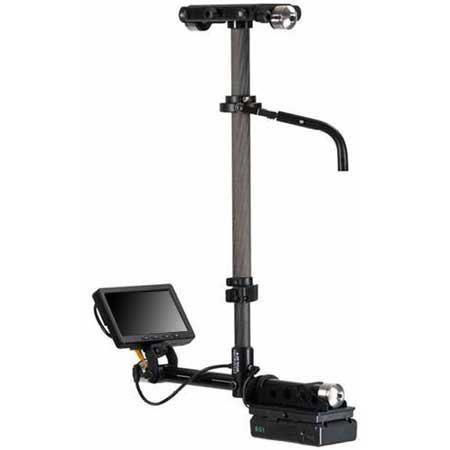
The Steadicam mainly consists of 3 major components: The Sled, The Vest and the Arm.

Pictured are parts of the Steadicam M-2.

Sled

Pictured is a Steadicam Pilot, a smaller rig for DSLR sized cameras.

The Sled is the post you see here. The camera is mounted on top, there’s a monitor at the bottom, and batteries power everything from the bottom. This is where the electronics live. There’s wires inside that travel from the top of the top stage to the very bottom where the batteries and monitor reside.

Arm

Pictured is a G-70x arm. This arm can handle 13-70lbs of weight.

The arm is really where a lot of the magic happens. The arm has sections and springs that compress or expand to lift or lower the rig with ease. The arm also isolates movement, taking away the natural bounce of a human’s walk and translating it into smooth moving video.

Vest

Two types of vests pictured above: A Fawcett Exovest and a GPI Pro vest. There are several varieties.

The Vest is where this contraption connects to a human body. The vest takes the weight and distributes it across the body. They are quite adjustable. Only in certain cases will an operator need to get a specific type of vest, due to small size or even just preference.

Let’s take a look at the top of the sled

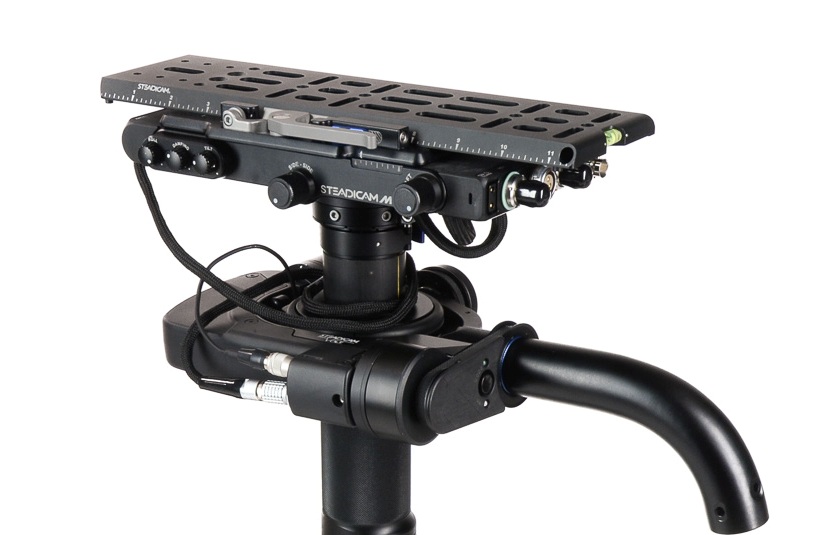
Here’s an example of the top stage (top platform where the camera ends up being mounted). There’s a plate that goes on the very top that you screw the camera into. Adjustment knobs on the sides move that plate either left and right or front and back. This will serve in helping balance the camera.

Also on the top stage are all sorts of places to plug in wires! Several of these inputs are to get power from the battery at the bottom into the camera or to power the accessories. Why not just leave a battery on the camera when you put it up there? Well, you can, but anything you put on the Steadicam will add more weight. Sometimes, you gotta remove as much weight as possible.

You can also see the SDI inputs (pictured right, at the short end of that top stage). This is how you get the video feed from the camera to the monitor at the bottom of the sled.

The Gimbal

This is the handle that sticks out from the sled post and connects to the arm.

The gimbal is 3-axis, meaning it moves freely in three directions for pans, tilts and roll. The gimbal handle that connects to the arm is where the right hand goes, and the handgrip below on the post itself is where the left hand goes. This can be reversed for left-handed users who operate “goofy footed.”

Other Accessories

Plenty of other accessories and mounting devices enable the Steadicam operator to work in different conditions. There are mounts so they can operate from a car, more advanced gimbal technology in the form of the Volt, and things like rickshaws and the Trinity to change the possibilities of what operating can offer.

But this is an intro series and you’ll have to dig into all that when you decide you want to learn more.

Part 3: Balancing and Operating, is coming next.